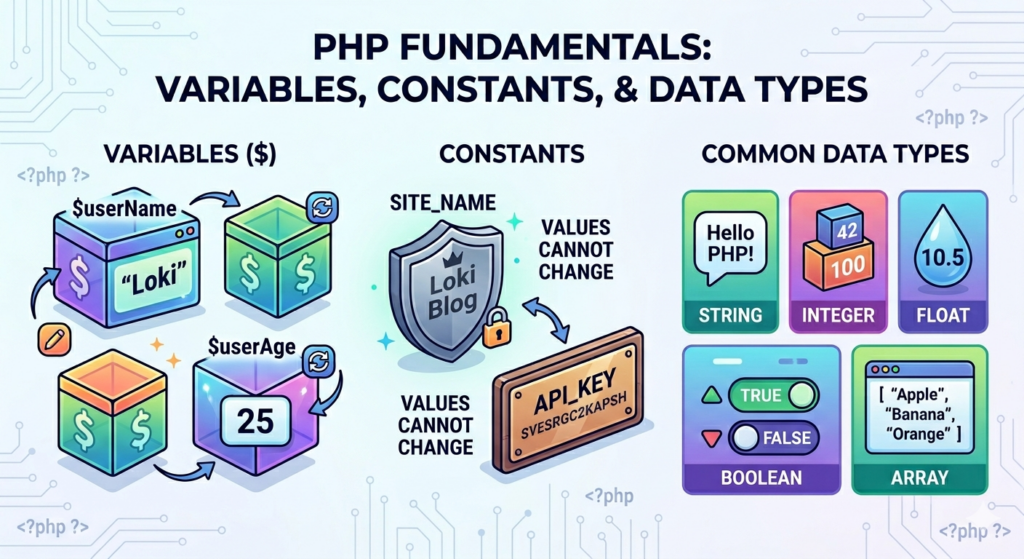
PHP Variables, Constants, and Data Types Explained
In the previous article, we learned what PHP is and how it works. In this tutorial, we’ll explore three fundamental concepts every PHP developer must understand:
- Variables
- Constants
- Data Types
These concepts form the foundation of PHP programming and are used in every PHP application, including WordPress and Laravel projects.
What is a Variable in PHP?
A variable is used to store data that can be used and modified throughout your program.
In PHP, variables start with a dollar sign ($).
Syntax
$variable_name = value;Example
<?php
$name = "Loki";
echo $name;
?>
Output:
LokiRules for Naming PHP Variables
PHP variables follow a few important naming rules:
- A variable must start with a
$sign. - The variable name must start with a letter or underscore.
- A variable name cannot start with a number.
- Variable names can contain letters, numbers, and underscores.
- PHP variable names are case-sensitive.
Valid Variable Names
$name = "Loki";
$age = 25;
$user_name = "Ali";
$_email = "example@email.com";
Invalid Variable Names
$1name = "Loki";
$user-name = "Ali";
These variable names are invalid because they either start with a number or contain a hyphen.
Variable Case Sensitivity
PHP variable names are case-sensitive.
<?php
$name = "Loki";
$Name = "Ali";

echo $name;
echo $Name;
?>
Output:
Loki
Ali
These are treated as different variables.
Assigning Values to Variables
String
$name = "Loki";Integer
$age = 25;Float
$price = 99.99;Boolean
$isActive = true;Array
$colors = ["Red", "Blue", "Green"];NULL
$name = null;Combining Variables with Text
Method 1: Concatenation
You can combine strings and variables using the dot (.) operator.
<?php
$name = "Loki";

echo "My name is " . $name;
?>
Output:
My name is LokiMethod 2: Variable Interpolation
PHP also allows you to place variables directly inside double-quoted strings.
<?php
$name = "Loki";

echo "My name is $name";
?>
Output:
My name is LokiWhat is a Constant in PHP?
A constant is a value that cannot be changed after it has been defined.
Unlike variables, constants do not use the $ symbol.
Syntax
define("CONSTANT_NAME", "value");Example
<?php
define("SITE_NAME", "Loki Blog");

echo SITE_NAME;
?>
Output:
Loki BlogWhy Use Constants?
Constants are useful for values that never change.
Examples include:
- Website name
- Database configuration
- API URLs
- Company information
define("COMPANY_NAME", "ABC Solutions");
define("SUPPORT_EMAIL", "support@example.com");
PHP Data Types
A data type defines what kind of value a variable can store.
PHP supports several data types.
1. String
A string is a sequence of characters.
$name = "Loki";Example
<?php
echo $name;
?>
2. Integer
An integer is a whole number without decimal points.
$age = 25;Examples include:
10
25
100
-50
3. Float
A float is a number that contains a decimal point.
$price = 99.99;Floats are commonly used for prices, measurements, percentages, and other decimal values.
4. Boolean
A Boolean can have only two values:
true
false
Example
$isAdmin = true;
$isPaid = false;
Booleans are commonly used when working with conditions and user permissions.
5. Array
Arrays store multiple values in a single variable.
Example
<?php
$colors = ["Red", "Blue", "Green"];

echo $colors[0];
?>
Output:
RedArrays are very important in PHP and are used frequently in WordPress development.
6. NULL
NULL represents a variable with no value.
$name = null;A variable can contain NULL when no value has been assigned or when its value has intentionally been cleared.
Checking Data Types
PHP provides the var_dump() function to display information about a variable, including its data type.
Example
<?php
$name = "Loki";

var_dump($name);
?>
Output:
string(4) "Loki"You can use var_dump() while debugging PHP applications to understand the value and type of a variable.
Variables, Constants, and Data Types Together
Let’s combine variables, constants, and different data types in one example.
<?php
$name = "Loki";
$age = 25;
$isPremium = true;

define("SITE_NAME", "Loki Tutorials");

echo "Welcome to " . SITE_NAME;
echo "<br>";
echo "Name: " . $name;
echo "<br>";
echo "Age: " . $age;

?>
Output:
Welcome to Loki Tutorials
Name: Loki
Age: 25
Common Beginner Mistakes
Forgetting the Dollar Sign
Wrong:
name = "Loki";Correct:
$name = "Loki";Using Quotes Around Constants
Wrong:
echo "SITE_NAME";This prints the text SITE_NAME instead of the constant’s value.
Correct:
echo SITE_NAME;Variable Case Sensitivity
Remember that these are different variables:
$name = "Loki";
$Name = "Ali";
Best Practices for PHP Variables
- Use meaningful variable names.
- Use consistent naming conventions.
- Avoid unnecessary global variables.
- Initialize variables before using them.
- Use constants for values that should not change.
Good example:
$user_name = "Loki";
$product_price = 999;
$is_logged_in = true;
Conclusion
PHP variables, constants, and data types are fundamental concepts that every PHP developer needs to understand.
Variables allow you to store and change data, constants allow you to define values that should remain fixed, and data types determine what kind of information a variable contains.
Understanding these concepts will make it much easier to learn PHP operators, conditions, loops, functions, and eventually WordPress development.
In the next tutorial, we’ll learn about PHP Operators and how they are used to perform calculations and make decisions in PHP.