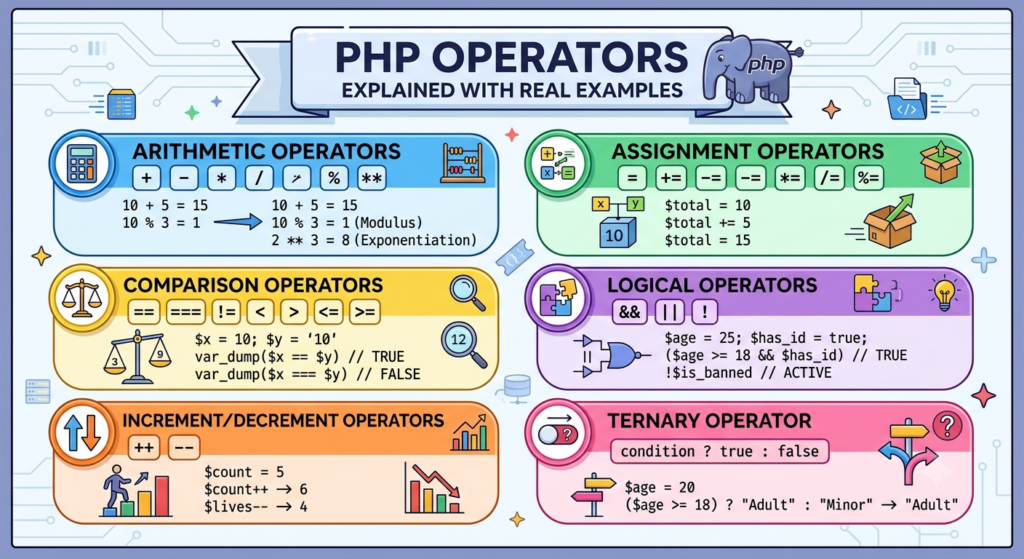
PHP Operators Explained with Real Examples
In the previous tutorial, we learned about PHP variables, constants, and data types. Now let’s explore PHP Operators, which are used to perform operations on variables and values.
Operators are used in almost every PHP application, from simple calculations to complex business logic in WordPress plugins and web applications.
What Are Operators in PHP?
Operators are symbols that tell PHP to perform specific actions.
Example:
<?php
echo 5 + 3;
?>
Output:
8Here, + is an operator that adds two numbers.
Types of PHP Operators
PHP provides several types of operators:
- Arithmetic Operators
- Assignment Operators
- Comparison Operators
- Logical Operators
- Increment/Decrement Operators
- Ternary Operator
1. Arithmetic Operators
Arithmetic operators are used for mathematical calculations.
| Operator | Description |
|---|---|
| + | Addition |
| – | Subtraction |
| * | Multiplication |
| / | Division |
| % | Modulus |
| ** | Exponentiation |
Example
<?php
$a = 10;
$b = 5;

echo $a + $b;
echo "<br>";

echo $a - $b;
echo "<br>";

echo $a * $b;
echo "<br>";

echo $a / $b;
?>
Output:
15
5
50
2
Modulus Operator (%)
Returns the remainder after division.
<?php
echo 10 % 3;
?>
Output:
1Exponentiation Operator (**)
<?php
echo 2 ** 3;
?>
Output:
82. Assignment Operators
Assignment operators assign values to variables.
Basic Assignment
<?php
$name = "Kaif";
?>
Addition Assignment
<?php
$total = 10;
$total += 5;

echo $total;
?>
Output:
15Subtraction Assignment
<?php
$total = 20;
$total -= 5;

echo $total;
?>
Output:
15Multiplication Assignment
<?php
$price = 10;
$price *= 3;

echo $price;
?>
Output:
303. Comparison Operators
Comparison operators compare two values.
| Operator | Meaning |
|---|---|
| == | Equal |
| === | Identical |
| != | Not Equal |
| > | Greater Than |
| < | Less Than |
| >= | Greater Than or Equal |
| <= | Less Than or Equal |
Example
<?php
$a = 10;
$b = 20;

var_dump($a < $b);
?>
Output:
bool(true)Equal Operator
<?php
echo 10 == 10;
?>
Output:
1Identical Operator
Checks both value and data type.
<?php
var_dump(10 === "10");
?>
Output:
bool(false)Because one is an integer and the other is a string.
4. Logical Operators
Logical operators combine conditions.
| Operator | Meaning |
|---|---|
| && | AND |
| || | OR |
| ! | NOT |
AND Operator
<?php
$age = 25;
$has_id = true;

if ($age >= 18 && $has_id) {
    echo "Allowed";
}
?>
Output:
AllowedBoth conditions must be true.
OR Operator
<?php
$is_admin = false;
$is_editor = true;

if ($is_admin || $is_editor) {
    echo "Access Granted";
}
?>
Output:
Access GrantedOnly one condition needs to be true.
NOT Operator
<?php
$is_banned = false;

if (!$is_banned) {
    echo "User Active";
}
?>
Output:
User Active5. Increment and Decrement Operators
These operators increase or decrease values.
Increment (++)
<?php
$count = 5;
$count++;

echo $count;
?>
Output:
6Decrement (–)
<?php
$count = 5;
$count--;

echo $count;
?>
Output:
46. Ternary Operator
A shorter version of an if-else statement.
Syntax
condition ? value_if_true : value_if_false;Example
<?php
$age = 20;

$result = ($age >= 18) ? "Adult" : "Minor";

echo $result;
?>
Output:
AdultReal-World Example: WooCommerce Product Discount
<?php
$product_price = 2000;
$discount = 10;

$final_price = $product_price - ($product_price * $discount / 100);

echo "Final Price: ₹" . $final_price;
?>
Output:
Final Price: ₹1800This type of calculation is commonly used in WooCommerce stores and custom eCommerce applications.
Operator Precedence
PHP follows precedence rules.
Example:
<?php
echo 10 + 5 * 2;
?>
Multiplication is performed before addition, so the result is:
20Using parentheses can make the order explicit:
<?php
echo (10 + 5) * 2;
?>
Output:
30Conclusion
Operators are the foundation of decision-making and calculations in PHP. Whether you’re building a WordPress plugin, a WooCommerce store, or a custom PHP application, you’ll use operators every day.
In the next tutorial, we’ll learn PHP Conditional Statements (if, else, elseif, switch) and build practical examples that control the flow of your applications.